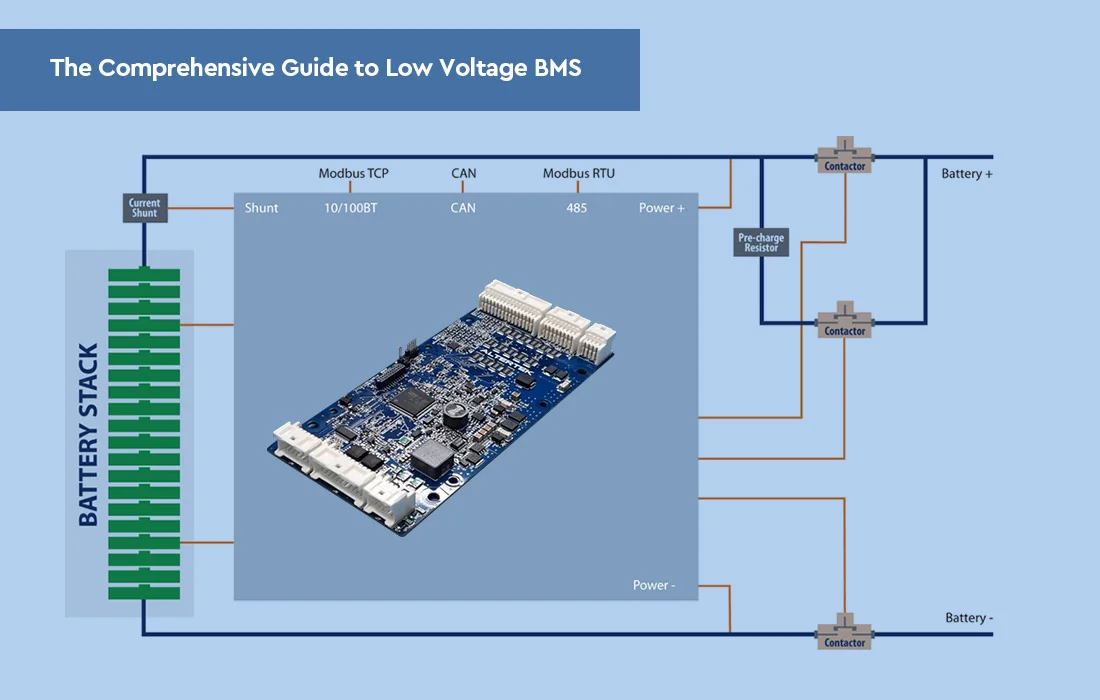
To add a smart battery management system to your lithium battery, you’ll need to follow a few steps:
- Research and Select a Compatible Smart BMS: Look for a BMS specifically designed for lithium batteries and ensure compatibility with your battery type (e.g., Li-ion, LiFePO4). Consider factors like voltage range, capacity, and features such as cell balancing, overcharge/over-discharge protection, temperature monitoring, and communication protocols.
- Collect the Essential Tools and Equipment: Basic tools like wire cutters, wire strippers, a soldering iron, heat shrink tubing, and electrical tape may be necessary. Additionally, make sure to have the appropriate connectors, wires, and insulation materials based on your BMS requirements.
- Disconnect the Battery: Ensure that the battery is disconnected from any power source or load.
- Determine BMS Placement: Decide where to mount the BMS. Usually, it’s advised to place it in a well-ventilated location, keeping it clear of excessive heat or moisture. Check the BMS manufacturer’s guidelines for specific recommendations.
- Connect the BMS: Follow the wiring diagram provided by the BMS manufacturer to connect the BMS to your lithium battery. This usually involves connecting the BMS balance wires to each cell of the battery pack, as well as the main positive and negative leads. To prevent short circuits, make sure there is adequate insulation and secure connections.
- Configure and Test: Depending on the specific BMS model, you may need to configure settings such as voltage thresholds, current limits, and communication protocols. Follow the instructions provided with the BMS to set it up correctly. Once connected, test the BMS functionality, including cell balancing, voltage monitoring, and any additional features it offers.
- Enclosure and Safety: After successfully installing and testing the BMS, it is important to enclose the battery and BMS in a suitable housing or enclosure. This protects the components from damage and ensures safety. Make sure the enclosure allows for proper heat dissipation and ventilation.
It’s important to mention that the BMS connection and installation procedure might differ based on the particular smart BMS model and the intricacy of your battery assembly. It’s recommended to carefully read the BMS manufacturer’s instructions and consult any relevant documentation to ensure a successful BMS installation. If you have doubts about any step, it’s recommended to seek help from a certified expert or an individual experienced in handling battery systems.
MORE: How can wireless BMS contribute to the smart battery ecosystem?